Moovit: Your Transit Tracker
- 3.8
- Rating
- 100.00M
- Installs
- Free
- Price

 Analysis by App-foxy
When I need to cross a city without driving, the part that matters most is not finding a station on a map; it is knowing whether the next bus or train is actually useful right now. That is the reason I keep coming back to Moovit: Your Transit Tracker. It is a free public-transport app from Moovit for Android and iOS, built around live bus and train information and route planning. In my experience, its biggest value is turning an uncertain journey into a sequence of decisions: where to walk, which service to take, when to leave, and whether a delay changes the plan.
The app sits in the Maps & Navigation category, but I do not use it as a general replacement for every map application. I use it when public transportation is the main part of the trip. That distinction is important. A normal map can show roads, landmarks, and driving directions very well, while Moovit puts the timetable and the transit connection at the center. For a commuter, visitor, student, or anyone who does not want to guess whether a bus has already gone, that focus can be more useful than a broader map interface.
Moovit has been available since March 28, 2012, and its scale is easy to see from its store presence: it has more than 100 million installs, an average rating of 3.9 from around 1.5 million ratings, and roughly 39 thousand written reviews. Those figures suggest a widely used service, but they also tell me to keep expectations realistic. A large transit app can cover many places, yet the quality of live information still depends on the city and the transport operators behind it.
In-Depth Coverage of Moovit: Your Transit Tracker
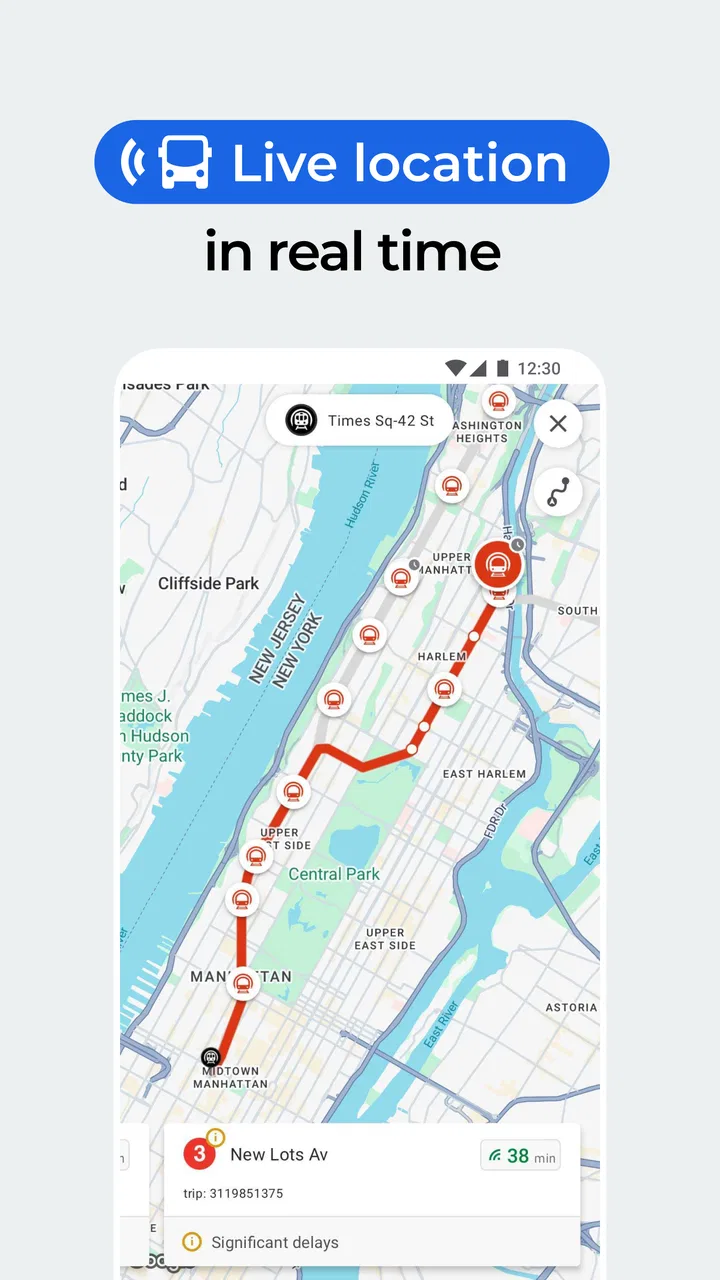
Real-time transit information is the feature that changes the journey
I find real-time transit information most valuable at the point when a plan might need to change, rather than as a number to keep watching throughout a trip. In this section, I look at how checking departures before leaving and again near a connection can help me choose a sensible next step, while still leaving room for local signs and conditions.
Why live departures matter more than a static map
A static route is only a suggestion. If I am standing at a stop and the next bus is late, cancelled, or already gone, the route that looked perfect a few minutes earlier may no longer be the best one. Moovit’s central strength is that it brings scheduled services and current transit conditions into the same planning experience. I can look at a route, compare departures, and make a choice based on the trip as it is happening rather than how it was supposed to happen.
That sounds like a small difference, but it changes how I behave. Instead of walking quickly to a stop simply because a timetable says a bus should be there, I can check whether waiting makes sense. If the next option is too far away, I can reconsider the route before spending time walking in the wrong direction. The app is most useful at these decision points, not merely when I am planning a journey from home.
The practical benefit is especially clear when several transport modes overlap. A route may involve a walk, a bus, and a train, and a small delay in the first part can affect the connection that follows. Having the transit sequence presented together makes it easier for me to judge the entire trip rather than treating every leg as a separate search.
How I use it before leaving
Before starting, I enter the destination and check the suggested public-transport routes. I look beyond the first result. The quickest option on screen may involve a tight transfer, while a slightly slower alternative may be easier if I am carrying luggage, travelling with a child, or unfamiliar with the area. I also pay attention to the walking portions, because a route that looks efficient in total can feel inconvenient if the first or last walk is awkward.
My preferred workflow is to compare the departure options, identify the important transfer, and then check the live status again just before I leave. This second check is one of the more useful habits to develop. Looking once at home is not enough when the journey depends on a service that may change. A route planner is only as helpful as the moment at which I consult it.
I also avoid treating the displayed arrival time as a promise. It is better to use it as a planning estimate and leave room for walking, crowded platforms, and the time needed to find the correct stop. The app can reduce uncertainty, but it cannot remove the ordinary friction of public transportation.
How the app helps while I am already travelling
Once I am on the move, I use Moovit as a checkpoint tool. At the first stop, I confirm that I am waiting for the right service. After boarding, I check the remaining route and prepare for the transfer instead of relying entirely on memory. This is particularly helpful in unfamiliar cities, where several stops may have similar names or where a station has multiple exits.
A less obvious advantage is that live information can help me choose when not to rush. If the next connection is not immediately available, I may stay on a current service for longer or select another route rather than leaving at the wrong stop. The app does not make that judgement for me, but it gives me the information needed to make it deliberately.
For visitors, I find this more valuable than simply saving a route in advance. A saved plan can become outdated as soon as the day changes. Rechecking the current service shortly before each major leg keeps the plan connected to reality. That is a simple workflow, but it is one of the clearest ways to get more from the app than a one-time route search.
You May Also Like

 AccuWeather: Weather Radar
AccuWeather Review: A Quick, Clear Forecast for Everyday Decisions
For everyday plans, the best forecast is the one you can understand quickly. AccuWeather makes rain timing, radar, and local conditions easy to act on, with a few trade-offs.

 Hill Climb Racing
Why Hill Climb Racing Still Turns Crashes Into One More Run
A tiny car, a bumpy hill and one more upgrade: Hill Climb Racing keeps resurfacing because its simple chaos makes every near-miss feel personal.

 AliExpress - Shopping App
AliExpress Makes Global Shopping Feel Personal, but Shoppers Bear the Risk
AliExpress turns a global marketplace into a pocket-sized discovery engine. Its reach is useful, its shopping loop compelling, and its trade-offs easy to miss.

 Lords Mobile: Kingdom Wars
Lords Mobile Is a Kingdom-Building Routine, Not a Quick Match
A case-by-case verdict on the building, battles, device demands, and social commitments that make Lords Mobile rewarding for some players and exhausting for others.

 PDF Scanner app - TapScanner
TapScanner Makes Paperwork Easier to Capture, Check, and Share
TapScanner makes scanning with a phone feel less like a rescue operation and more like a dependable step in getting work done. Its capture tools are useful, though not flawless.

 Block Blast!
Block Blast! Shows How Much a Puzzle Game Can Leave Out
A quiet grid game shows why puzzle players increasingly value instant clarity, repeatable skill and low-pressure play—and where the genre still needs to catch up.
More From Our News Desk
View All News


A realistic everyday journey
Imagine I have an appointment across town on a weekday morning. I know the general direction, but the trip requires a local bus followed by a train. I open Moovit before leaving, compare the available departures, and choose a route with a little more breathing room instead of the most aggressive connection. At the bus stop, I check the live departure again. If the bus is delayed, I can see whether waiting still makes sense or whether another route offers a better chance of arriving on time.
On the bus, I use the route details to keep track of the transfer. When I reach the station, I do not need to reconstruct the journey from memory. I can check the next train and decide whether to walk directly to the platform or take a moment to orient myself. If the return trip happens later, I repeat the process rather than assuming that the morning route will be equally convenient in the opposite direction.
This is where the app earns its place on my phone. It is not doing something dramatic; it is reducing several small moments of doubt. Those moments add up when I am late, unfamiliar with the city, or travelling during a busy period.
Where the experience is strong, and where I stay cautious
The experience works best when I treat Moovit as a transit-focused guide, not an all-purpose guarantee. I’ll weigh the situations where its route choices and live updates are genuinely useful against the times I would rather check an operator’s own information, keep a backup plan, or choose a simpler navigation tool.
The best fit for commuters and city visitors
I think Moovit is strongest for people who use buses and trains often enough to care about timing but do not want to memorize every route. Regular commuters can use it to check changing departures and compare alternatives. Visitors can use it to understand how a city’s transit network fits together without learning the whole system in advance. It is also useful for occasional riders who know their destination but are unsure which stop or connection is practical.
The app is less compelling if I already know one simple route and its schedule rarely changes. In that situation, opening a broader map or checking the operator’s own timetable may be faster. Moovit becomes more valuable when there are multiple choices, live uncertainty, or a transfer that needs attention.
Coverage does not guarantee equal local quality
The wide install base can make the app feel universal, but I would not assume that every city provides the same level of detail. Transit information is local by nature. Some places may offer useful live departures, while others may rely more heavily on scheduled information or provide less precise stop detail. The sensible approach is to test the app on a familiar route before trusting it for an important appointment in an unfamiliar place.
I also compare the result with the physical signs at the stop when something looks unusual. An app can show a sensible route and still leave practical questions: which side of a divided road has the stop, whether a station entrance is open, or whether a temporary change affects the platform. Moovit helps me plan, but I still treat local signs and operator announcements as important evidence.
Speed, clarity, and the cost of too much information
When I am in a hurry, I want the next useful action immediately. Route choices, departure times, walking instructions, and transfer details can all be valuable, but they can also make the screen feel busy. I have learned to focus on one leg at a time instead of trying to absorb the entire journey at once. That keeps the app practical rather than overwhelming.
Another trade-off is that live planning encourages repeated checking. That is useful when a service is uncertain, but it can become a habit that adds stress if I keep refreshing without a clear reason. I get better results when I check at defined moments: before leaving, at the departure stop, and before a major transfer.
The free price makes it easy to try without committing money. The app is rated for Everyone, which fits its broad public-transport purpose. Optional in-app purchases range from $0.99 to $19.99 per item, so I would review any paid option carefully and decide whether it solves a problem I actually have. For basic route planning and transit checking, I would first see how well the free experience works in my own city.
When another option may be better
I would choose a general map application when I need detailed walking directions, driving navigation, business discovery, or a wide overview of roads and places. I would look at an official transport operator’s app or website when I need a service notice, ticket rule, platform instruction, or other information that belongs directly to that network. Moovit is most convincing when the question is, “What public-transport route should I take now, and what is happening with it?”
I would also skip relying on it alone for a journey where missing the connection has serious consequences. For an airport departure, examination, interview, or medical appointment, I would use Moovit to compare routes but add extra time and verify the key service through local signage or the operator. Real-time information is helpful precisely because it acknowledges change; that also means it should not be mistaken for certainty.
Small habits that make the app more dependable
First, I check the route from my actual starting point rather than from a nearby landmark. A short difference in walking direction can change which stop is convenient. Second, I inspect the transfer instead of assuming that the app’s fastest route is the easiest one. A route with fewer minutes may demand a hurried interchange, while a calmer option is better for many everyday trips.
Third, I recheck the return journey separately. Transit patterns, departure choices, and personal energy can be different later in the day, and the best outbound route is not automatically the best way home. Finally, I keep a backup in mind when the trip is important. Knowing the next reasonable alternative is often more useful than repeatedly hoping the first route improves.
These habits reveal the real role of Moovit: it is not a substitute for judgement. It is a way to make judgement quicker and better informed. The app gives me a current picture of the transit options, while I decide how much walking, waiting, uncertainty, and transfer complexity I am willing to accept.
Who gets the most value from it
I recommend Moovit most readily to people who live in a city with several bus or rail choices and who regularly face changing departure times. It is also a strong companion for travellers who want public transportation without planning every detail days ahead. The live focus is valuable for anyone who has experienced the frustration of arriving at a stop only to discover that the expected service is not useful anymore.
It is a weaker fit for someone who rarely uses public transit, travels only on a single familiar line, or needs a specialised official service more than a multi-route planner. It may also disappoint users who expect identical information quality in every location. The right question is not whether it replaces every navigation tool, but whether its transit-first view matches the way I travel.
After using it as a day-to-day transit companion, my opinion is positive but measured. Its real advantage is the connection between route planning and current departures, especially when a journey includes a transfer or when the first plan may change. The experience still benefits from common sense, extra time, and occasional confirmation from local sources, but it removes much of the guesswork that makes city travel tiring.
For a free app from Moovit with a broad reach and a clear public-transport purpose, I think it is worth installing if buses and trains are part of your routine. I would begin with a route I already know, compare its results with the stop information around me, and then use it for more complicated journeys. That approach gives me a realistic sense of its local usefulness instead of assuming the same experience everywhere.
My final recommendation is simple: choose Moovit: Your Transit Tracker when the difficult part of your trip is timing and connections, not merely finding a place on a map. It is at its best when I need to decide what to do next, and it is less necessary when the journey is already obvious. Used with that expectation, it can make everyday public transportation feel considerably more manageable.
FAQs for Moovit: Your Transit Tracker
01What is Moovit and how does it work?
Moovit is a transit app designed to simplify your public transportation experience. It provides real-time updates, live directions, and service alerts for buses, trains, subways, and more. By entering your destination, Moovit offers the fastest routes and alternate options. It’s like having a personal transit assistant in your pocket.
02Is Moovit available in my city?
Moovit covers over 3,000 cities in more than 100 countries, making it highly likely that your city is included. You can check the list of supported cities on Moovit's website or within the app itself. The app continually expands its coverage, ensuring users have access to reliable transit information globally.
03Does Moovit require an internet connection to function?
Yes, Moovit requires an internet connection to provide real-time updates and directions. However, once you’ve checked a route, you can access the details offline. For the most accurate and up-to-date information, it’s recommended to stay connected to the internet while using the app.
04How accurate are Moovit's real-time updates and alerts?
Moovit relies on a combination of official transit data and user contributions to ensure accuracy. While real-time updates are generally reliable, there can be occasional discrepancies due to unforeseen events or infrastructure issues. Moovit strives to keep information as current and precise as possible.
05Is Moovit free to use, and are there any in-app purchases?
Moovit is free to download and use for accessing basic transit information and planning routes. There are no mandatory in-app purchases, but the app may offer premium features or ad-free versions at an additional cost. These optional purchases enhance the user experience but are not required for standard functionality.
Pros
- Real-time transit updates enhance planning.
- User-friendly interface simplifies navigation.
- Covers a wide range of global cities.
- Offers multiple route options for efficiency.
- Integrates with other transport apps easily.
Cons
- Occasional inaccuracies in arrival times.
- Requires constant internet connection.
- Heavy battery usage during prolonged use.
- Contains ads in the free version.
- Limited offline functionality.

Moovit: Your Transit Tracker
Gallery